Meet Timely: The iPhone Countdown App Built for Calm
There's a particular kind of state that I think a lot of us know. You've got an appointment a few hours out and you're getting on with things, mostly. It just keeps surfacing. You check the time. You do the calculation again. If I leave at 2:15, and it takes twenty minutes to get there, and I want to be early... You already did this math twenty minutes ago. You do it again anyway.
I built Timely because I knew what the solution was.
My name is Rowan, I'm a wedding videographer based in New Zealand, which might be a strange background for an app developer. But fifteen years of weddings will do something to your relationship with time. Capturing a wedding day, you don't just track when things are. You track when you need to move.
That habit was the seed of Timely.
When I briefly moved from Christchurch to Wellington a few years back, I was flying home constantly for weddings. I was catching a lot of mid-morning flights, and I am a nervous pre-flight person. Not about flying itself, just about getting there. The calculation (when do I need to leave, how long will it take, will I make it through security) ran on a loop in the background of my whole morning. Even when I had plenty of time, the stress never went away, i was always calculating, recalculating and constantly checking the time.
So I did what I always do: I built a system. I've been deep into Apple Shortcuts for years, and my first attempt was a Shortcut that converted a departure time into a live timer on my lock screen. I need to leave at 2pm: start a 3h 40m timer. It worked. And having that number visibly counting down meant I could actually use my morning. I could go into the city, run errands, get coffee, knowing exactly how much runway I had. "I've got four hours, I can definitely do this thing that'll only take an hour."
This one calming trick, completely changed how I felt the entire day before a flight.
The problem was that Apple's native timer is blunt. A big number, black and orange, no label, no context. And even after years of requesting it, Shortcuts still has no way to add a title to a timer. So I started looking at third-party apps. I found some good ones, but most barely supported Shortcuts. The ones that did, the support felt bolted on. The ones that came closest still forced the app open before the live activity could start, which meant any automation would silently fail the moment my phone was locked. I couldn't have a countdown automatically appear on my lock screen the morning of a flight.
The more I looked, the more I realised no timer app would ever truly fit anyway. And it wasn't just the Shortcuts problem. It was something more fundamental: most timer apps are about counting down through a set amount of time. Ten minutes. One hour. They show you a number, and usually a progress indicator relative to whatever duration you started with. But when you're counting down to a specific moment, the relationship back to when you started is irrelevant. At 8 hours, a progress bar moves so slowly it's useless. What matters isn't how far you've come. It's how far you've got left.
I just needed someone to build the thing I actually wanted.
That someone turned out to be me. Timely is my first app.
What Timely Is
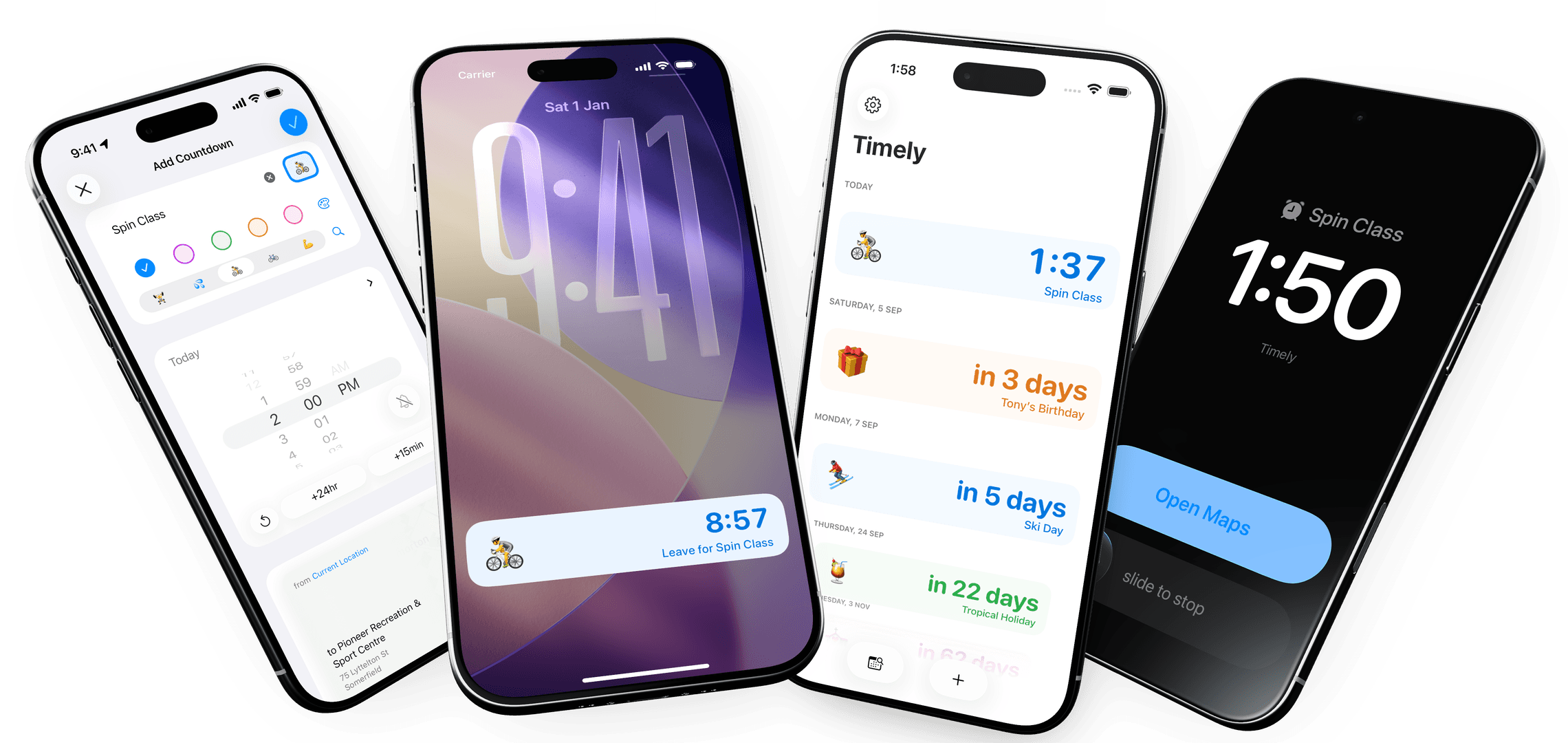
Timely is a countdown app for iPhone. You pick a moment and Timely shows you a live countdown: exactly how long you've got until it happens. No calculation required. Just numbers, counting down, answering the question that keeps surfacing.
But the best thing about Timely is where you see that number.
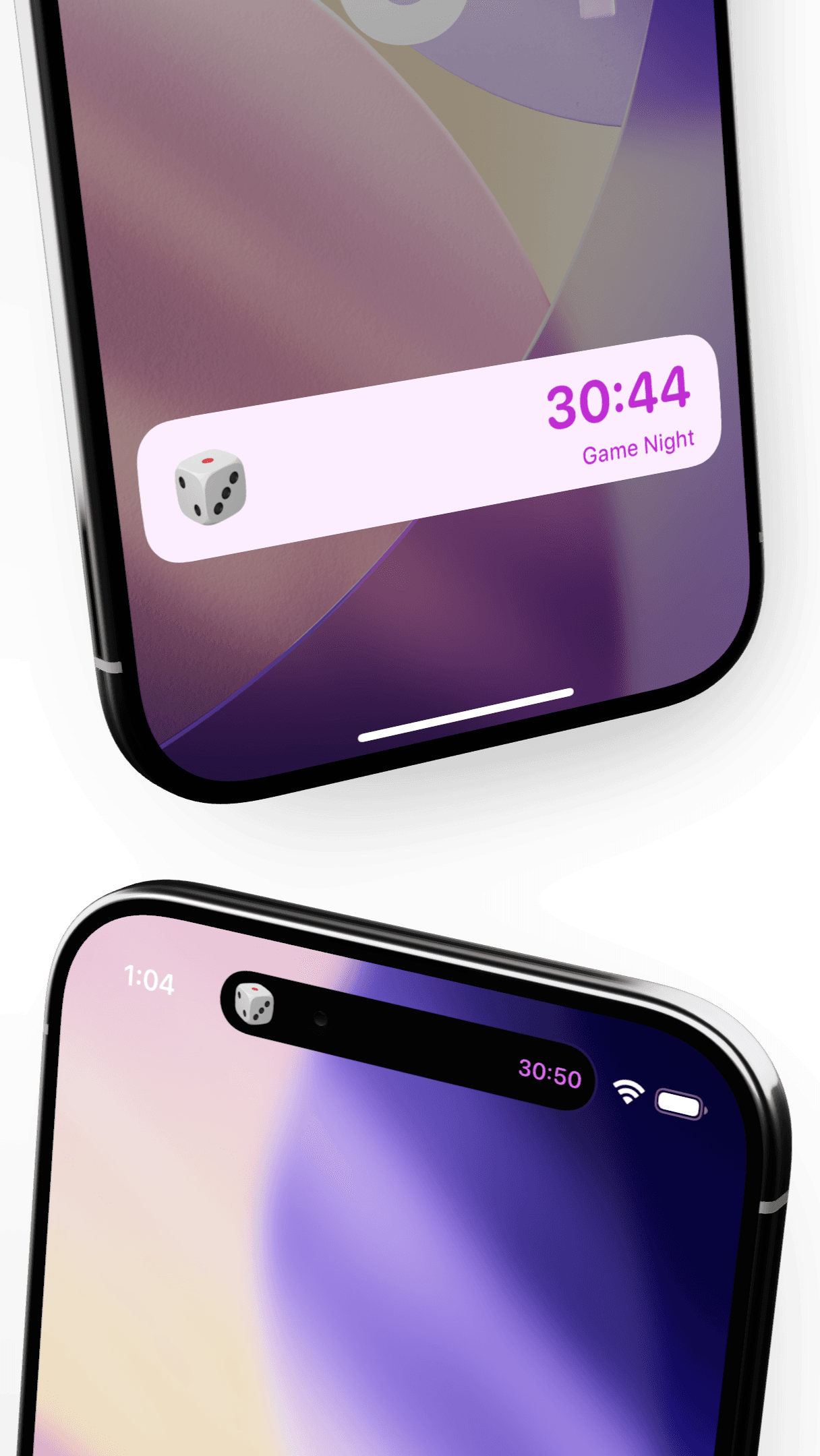
Once you've set a countdown, it lives on your lock screen, in the Dynamic Island, on your Apple Watch and on your Mac. It persists through whatever else you're doing, woven into iOS itself through Live Activities and Apple's Alarm Kit framework.
Timely is, by design, an app you barely have to open.
Countdowns are just there, calm numbers reassuring you at a glance that you're tracking fine. Or occasionally telling you something more urgent: tools down, fifteen minutes, time to go.
For power users, it goes further. Timely is built from the ground up to work with Apple Shortcuts and App Intents. You can create, modify, and manage countdowns entirely from Shortcuts, you can tie them to automations, trigger them on a schedule, or build pre-configured flows for things you do regularly. Set up a "leave for work" Shortcut once, set it to run each morning at 6am, and let the magic of modern computers handle everything each time.
The Time That Actually Matters
Here's the thing most countdown apps get wrong.
When you've got an appointment at 4:15pm, you're not really counting down to 4:15pm. You're counting down to the moment you need to head out the door. The event time isn't the moment that matters. The leave time is.
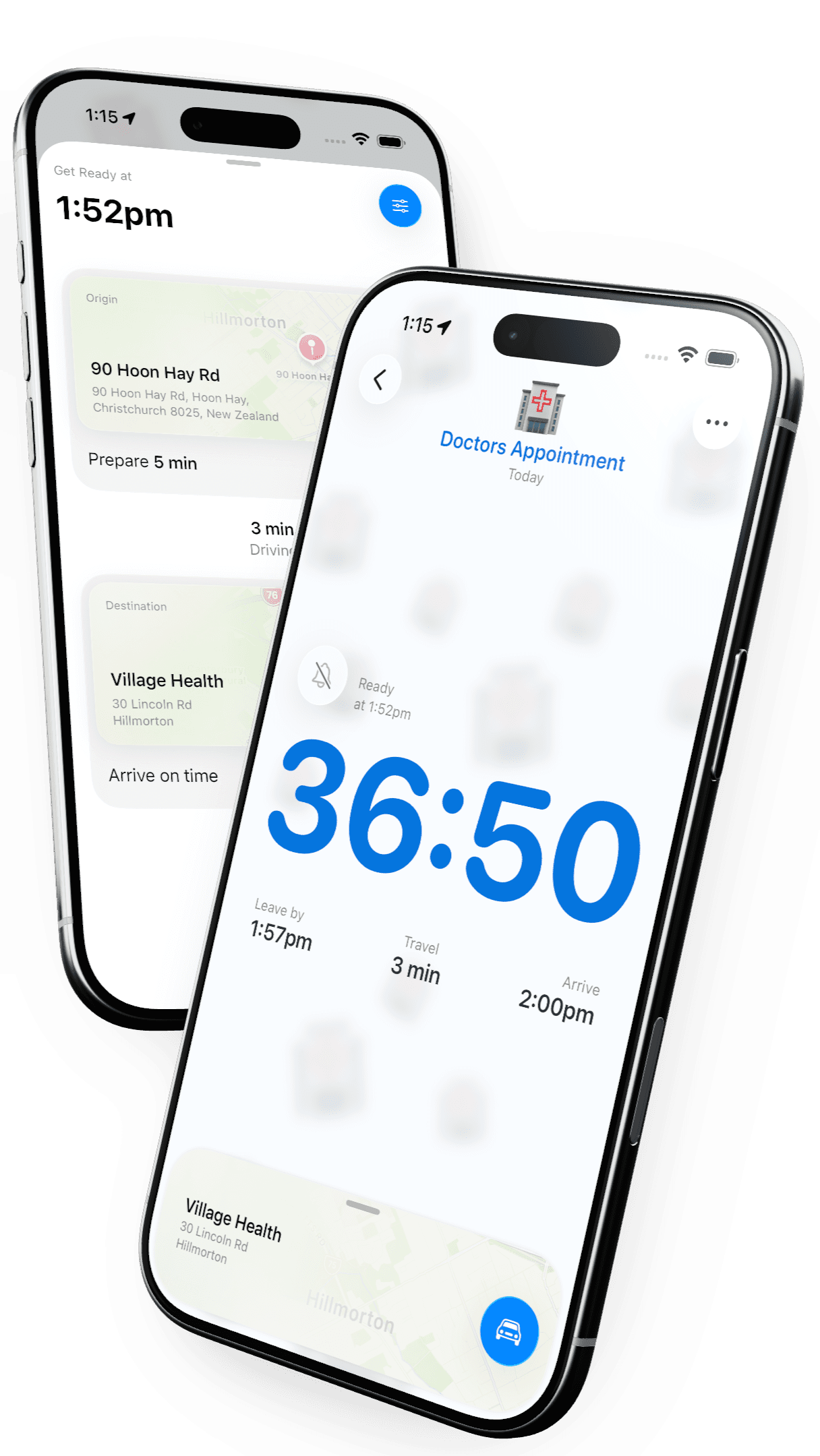
Timely knows this. When you add a location to a countdown, it estimates your travel time and lets you add a buffer on top, because sometimes the estimate is optimistic and you want a 5 extra minutes. Once you've done that, the countdown on your lock screen isn't showing you time until the event. It's showing you time until you need to leave for it.
This is great for appointments, meetings, reservations and anything that's going to require you to be somewhere, at a specific time.
A countdown with a location rolls back to the actual start of the stress point, and helps you from there.
Fun by Default
Every countdown in Timely has an emoji. which i think is fun, but its not just for fun, it's because a single emoji is genuinely the most efficient glanceable representation of what something is. ✈️ vs 🎂 vs 🏥. You know immediately what you're looking at.
The part I'm most proud of is how you get there. Timely uses an on-device language model (completely private, never leaving your phone) to automatically suggest an emoji the moment you type a title. Type "Dad dropping off the tent" and Timely picks something fitting without you having to scroll through thousands of options. It also surfaces alternates, so if the first suggestion is slightly off, the right one is usually one tap away.
It's a small thing. But it means the most potentially fiddly part of creating a countdown is basically handled for you. What's left is a title, the time and maybe, a location. which all up, usually takes less than 10 seconds
although if even that is too much, you'll love whats next
Getting a Countdown Started FAST
The easiest, fastest way to create a Timely countdown for something already in your schedule is to pull it straight from your calendar.
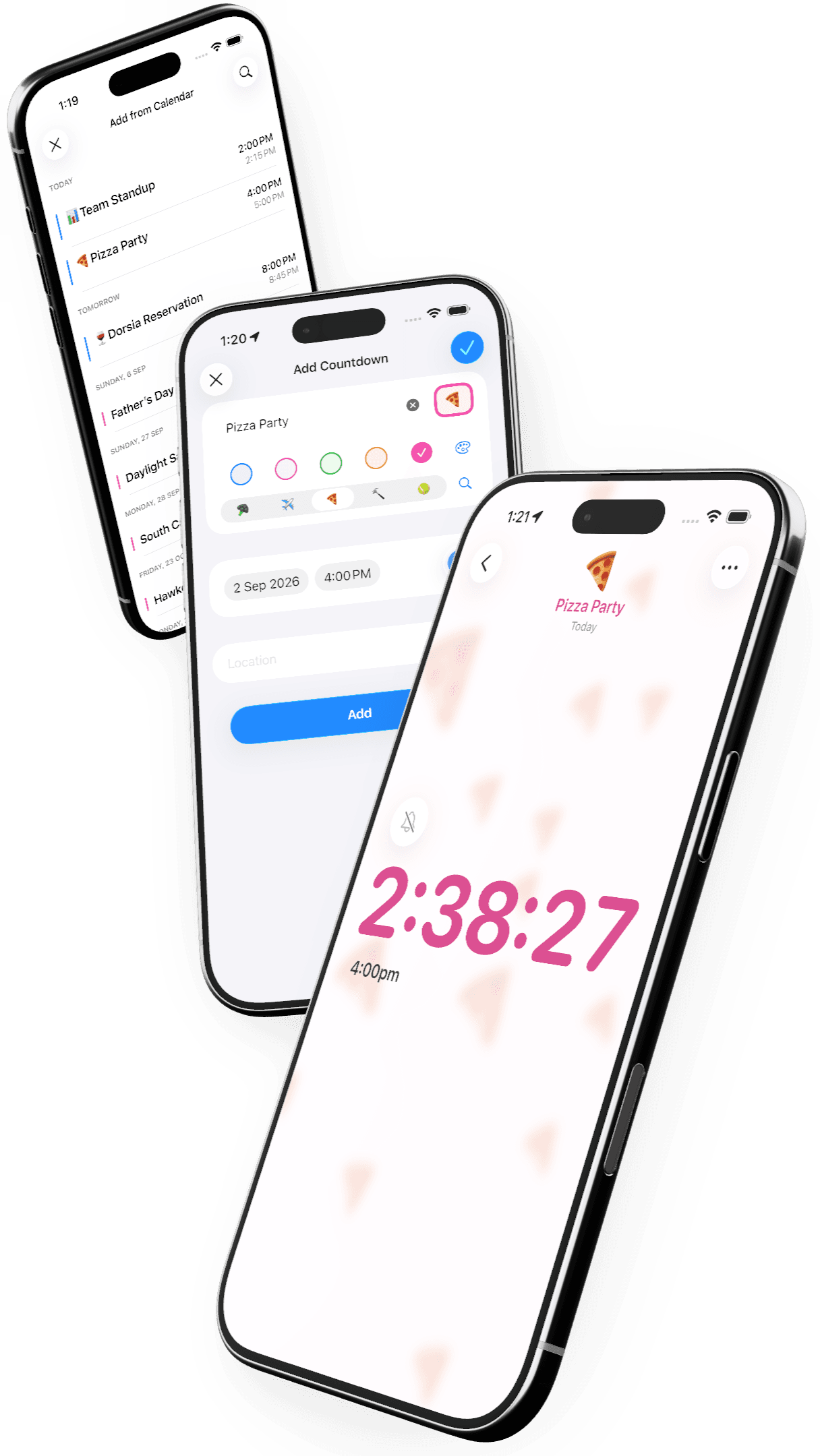
Tap the Add from Calendar button, and you'll see a list of your upcoming events. Tap one, and Timely pulls in the title, time, and location automatically. You'll see a preview and with one more tap, your countdown is live.
3 taps, to have a glanceable countdown to the next thing on your calendar.
At this point its worth clarifying one thing. Timely doesn't write to your calendar, or try to replace it. It reads it; your calendar stays exactly as it is. Think of it as a way of taking a moment from your schedule and bringing it into sharp focus.
Think of this feature, not as sync, but as search.
Who Timely Is For
I built Timely for everyone, but I knew exactly who I was building it for first. My fiancée Loran and I often found getting out of the house on time was more stressful than it needed to be. I've since been diagnosed with ADHD, and a lot of that experience suddenly made sense. I wanted something that gave us both calm without requiring either of us to think too hard about it. You set it up, it does its thing, you stop thinking about it.
A lot of my close friends are in the same boat, and several of them became my earliest beta testers. The phrase that kept coming back was that Timely "takes the math out of time management." That felt exactly right and it points to who Timely is really for, ADHD or not.
Timely is for anyone who's lost a morning to vague pre-event hovering. Anyone who runs the travel-time calculation three times before leaving. Anyone who's felt that small, quiet panic when they realise they should have left ten minutes ago.
If seeing a number count down is calming to you, if having that information visible takes something off your mental load, then Timely is probably going to feel immediately right.
Timely is free to download. No account, no sign-in, no ads, and no limit on how many countdowns you can add. Just set one up for whatever's coming up next glance at the live activity occasionally, and see what the rest of that day feels like.
That calculation you keep running in your head? You can stop now.